Table of Contents
- What Is YouTube CTR?
- How YouTube Calculates CTR
- Impressions vs Views: The Key Difference
- How Thumbnails Affect CTR
- How Titles Affect CTR
- Why CTR Changes Over Time
- CTR for New Channels vs Established Channels
- YouTube CTR Benchmarks by Niche
- CTR by Traffic Source
- Device Differences: Mobile vs TV
- Returning Viewers vs New Viewers
- When Your CTR Is Too Low
- How to Improve Your YouTube CTR
- Common CTR Mistakes
- FAQ
CTR tells you how often people click your video after seeing it. But what counts as good? Here are 2026 CTR benchmarks by niche, plus what actually moves the needle.
You open YouTube Studio, spot your CTR, and wonder: is this actually good? Most creators stare at that number without any frame of reference. A 4% CTR on a gaming channel might be disappointing. The same 4% on a finance channel might be above average. Context is everything.
This guide breaks down what CTR actually measures, how it varies across niches, and what levers you can pull to improve it. The benchmarks here are based on widely observed patterns across channels—not guarantees—because CTR is one of the most context-dependent metrics on YouTube.
What Is YouTube CTR?
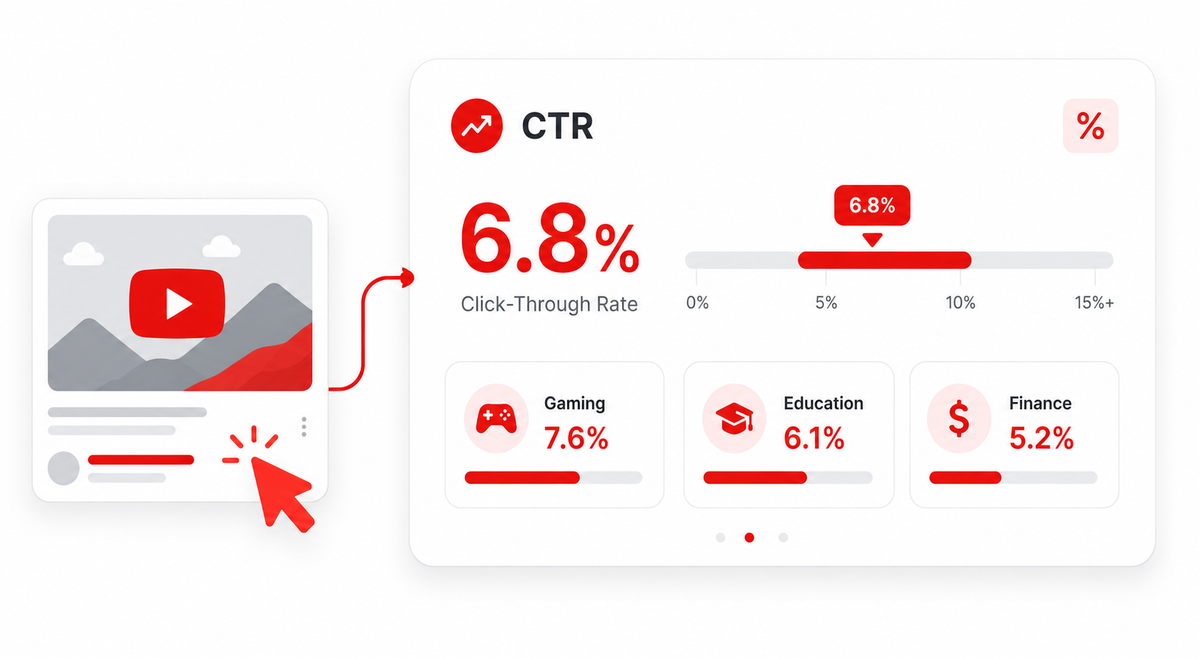
CTR—click-through rate—measures how often someone clicks your video after YouTube shows it to them. If your video gets shown 1,000 times and 50 people click it, your CTR is 5%.
YouTube counts an impression every time your thumbnail is displayed to a viewer for at least one second at 50% visibility or more. That includes appearances on the Home feed, search results, Suggested videos sidebar, Trending, and notifications. CTR is then the percentage of those impressions that result in a click.
It sounds simple, but the metric hides a lot of nuance. A high CTR doesn't automatically mean your channel is healthy—if people click and immediately leave, watch time and audience retention matter just as much. YouTube's algorithm weighs CTR alongside viewer satisfaction signals.
How YouTube Calculates CTR
YouTube's formula is straightforward: CTR = (Clicks ÷ Impressions) × 100. But what counts as an impression is worth understanding. YouTube only tracks impressions from surfaces it controls—meaning its own Home feed, Search, and Suggested sections. External traffic from Google search, social media shares, or direct links does not count toward your CTR. Neither do embedded players on other websites.
This matters because a video that relies heavily on external traffic will show a different CTR than one that spreads through YouTube's own recommendation system. When comparing your numbers against benchmarks, keep in mind that those benchmarks typically reflect YouTube-internal traffic.
Impressions vs Views: The Key Difference
Impressions and views are not the same thing. An impression is a thumbnail being shown. A view happens when someone actually watches your video—YouTube typically counts it after around 30 seconds of watch time.
Your CTR bridges the two. It tells you what fraction of impressions turned into clicks. Your view count tells you how many of those clicks became actual views. Both numbers matter. A high CTR with poor watch time suggests your thumbnail overpromised what the video delivers. A low CTR with excellent watch time suggests your content is strong but your packaging—thumbnail plus title—needs work.
How Thumbnails Affect CTR
Your thumbnail is the first visual signal a viewer sees. Before they read the title, before they check the channel name, they react to the image. A thumbnail that creates curiosity, communicates value, or triggers an emotional response can significantly outperform one that looks generic or cluttered.
The thumbnail and title work together. Neither operates in isolation. A strong thumbnail with a weak title will still underperform. Conversely, a compelling title can rescue a mediocre thumbnail to a point—but the visual impact of a thumbnail is harder to compensate for through text alone.
Key thumbnail factors that influence CTR include: face expressions (particularly surprise, curiosity, and genuine emotion), color contrast against YouTube's white background, readable text at small sizes, and visual clarity that reads well on a mobile screen. You can find detailed thumbnail design guidance in the Thumbix thumbnail design guide.
How Titles Affect CTR
Titles confirm what the thumbnail suggests. A thumbnail showing an intense expression and the word 'MISTAKE' creates intrigue—but the title needs to deliver specificity. "I Made a $15,000 Mistake Buying This Camera" turns vague curiosity into a specific reason to click.
Strong title elements include: numbers and specifics, clear benefit or outcome, natural inclusion of search keywords, and a sense that the video will answer a question the viewer already has. Avoid vague titles like "My Big Update" or "You Need to See This"—they create weak CTR because they give viewers no real reason to prioritize your video.
Why CTR Changes Over Time
CTR is not a fixed number. A video typically sees its highest CTR in the first 24–48 hours after publishing, when YouTube first shows it to your most engaged subscribers. These people already know your channel, trust your content, and are more likely to click.
As the video ages, YouTube starts showing it to broader audiences—people who haven't seen your channel before. These cold audiences have lower click rates because there's no existing trust. Your average CTR across the video's lifetime will drop as more of these impressions accumulate.
This is normal and expected. Don't compare a video's 30-day CTR to its first-week CTR without accounting for this shift in audience composition.
CTR for New Channels vs Established Channels
New channels often see misleadingly high CTR early on. When a channel is small, YouTube primarily shows videos to subscribers and people who've searched for related terms. These groups click more readily. But the sample size is tiny—100 impressions is not enough to draw meaningful conclusions.
Established channels that get significant Browse traffic—YouTube's Home feed recommendations—tend to see lower CTR because they're reaching far more unfamiliar viewers. A 3% CTR on a channel getting 5 million impressions per month is generating far more clicks than an 8% CTR on 10,000 monthly impressions.
The absolute CTR number matters less than what it produces in terms of clicks and views.
YouTube CTR Benchmarks by Niche
The following benchmarks are general observations based on patterns commonly reported by creators and YouTube educators. They are not official YouTube statistics and will vary based on your specific audience, channel size, video age, and traffic source mix. Use them as a rough reference point, not a performance guarantee.
Gaming
Gaming is one of YouTube's most competitive niches with massive viewer expectations. Thumbnails in gaming tend to be high-energy, face-forward, and emotionally intense. Viewers are often young and scroll fast.
Typical CTR range: 4%–8% for established gaming channels. New gaming channels, or channels testing in unfamiliar game territories, may see 2%–5%. Viral moments or trending game launches can push CTR above 10% temporarily.
Education
Educational content often reaches viewers through Search, where intent is high—people clicking because they specifically want to learn something. This creates more reliable CTR that's less sensitive to thumbnail design than entertainment niches.
Typical CTR range: 3%–6%. Channels that blend educational content with strong visual branding can reach 7%–9%. Pure tutorial channels that rank well in search can sustain 4%–7% because search-driven impressions convert well.
Finance
Finance content attracts high-intent viewers who are researching investment strategies, budgeting methods, or income opportunities. The thumbnail style leans on credibility signals—clean design, professional presentation, specific numbers.
Typical CTR range: 3%–6%. Finance channels that create curiosity-driven thumbnails ("I Invested $1,000 in X") can see 6%–9%. Very broad financial topics targeting beginners can achieve higher CTR because of wide search demand.
Business and Entrepreneurship
Typical CTR range: 3%–7%. Business channels that feature successful entrepreneurs or dramatic transformations often outperform purely informational content. The niche rewards both expertise signals and storytelling.
Entertainment
Entertainment is broad. Reaction channels, challenge videos, and viral content can see extremely high CTR—sometimes 8%–15%—on individual breakout videos. But average CTR across an entertainment channel's library tends to normalize closer to 4%–8%. The niche is highly thumbnail-dependent; strong visual design drives disproportionate results here.
Vlogs
Vlog CTR is heavily audience-dependent. A creator with a passionate fanbase can see 7%–12% because returning viewers click almost everything. Channels growing through Browse recommendations may see 3%–5% as new audiences are less committed. Vlogs that attach the creator's name to a specific event or location ("I Moved to Japan") tend to outperform generic day-in-the-life content.
Tech and Reviews
Typical CTR range: 3%–7%. Tech review channels benefit from Search traffic, where someone looking for a specific product review clicks with high intent. Thumbnails showing the actual product clearly, alongside a clean brand-consistent design, tend to perform well. Opinion-based tech content ("Why I'm Switching from X to Y") can drive spikes above 8%.
Tutorials and How-To
Tutorial content relies heavily on Search, so CTR from that source is typically stronger (4%–8%) than Browse. People searching for "how to edit in DaVinci Resolve" click the result that looks most authoritative and beginner-friendly. Text on thumbnails matters more in this niche than in entertainment—viewers use it as a quick-scan filter.
News and Commentary
Typical CTR range: 2%–6%. News channels often reach broad, less engaged audiences through YouTube's Browse recommendations. CTR spikes on breaking news topics can be significant—but drop sharply as the topic ages. Evergreen commentary content tends toward 3%–5% over its lifetime.
YouTube Shorts
Shorts CTR works differently. Shorts are discovered primarily through the Shorts feed (a swipe-based format), where traditional CTR metrics don't apply in the same way—viewers are already in a passive scroll mode. When Shorts appear in Browse or Search as thumbnails, CTR tends to be lower than long-form content because the format itself signals shorter commitment. For creators comparing Shorts performance to long-form videos, direct CTR comparisons are rarely meaningful.
Quick Reference: CTR Benchmarks by Niche
These are observational ranges. Your actual CTR may differ significantly based on channel size, audience loyalty, traffic source mix, and video topic.
| Niche | Low CTR | Average CTR | High CTR |
|---|---|---|---|
| Gaming | 2%–3% | 4%–6% | 7%–10%+ |
| Education | 2%–3% | 3%–6% | 7%–9% |
| Finance | 2%–3% | 3%–6% | 6%–9% |
| Business | 2%–3% | 3%–7% | 7%–10% |
| Entertainment | 3%–4% | 4%–8% | 8%–15% |
| Vlogs | 2%–3% | 3%–7% | 7%–12% |
| Tech/Reviews | 2%–3% | 3%–7% | 7%–10% |
| Tutorials | 2%–4% | 4%–8% | 8%–12% |
| News | 1%–2% | 2%–6% | 6%–10% |
CTR by Traffic Source
Where your impressions come from dramatically shapes your CTR. YouTube Studio breaks CTR down by traffic source, which is one of the most useful views in your analytics.
Browse (Home Feed)
Browse impressions come from YouTube's Home page recommendations. These viewers are not searching for anything specific—they're passively scrolling. CTR here is typically lower because you're competing against dozens of other thumbnails for attention. If your Home feed CTR is 3%–5%, that's generally reasonable. If it's consistently below 2%, your thumbnail and title combination isn't stopping the scroll.
Search
Search CTR is typically higher than Browse because viewers are actively looking for something. If your video shows up for "how to invest $1,000" and someone typed that exact query, they're already motivated to click a relevant result. Search CTR of 5%–12% is common for well-optimized content.
Suggested Videos
Suggested video CTR varies widely. When YouTube places your video next to a closely related video, viewers are already in a specific mindset and your thumbnail has a clear context advantage. Suggested CTR of 3%–7% is typical. Videos that appear alongside hugely popular videos in their niche can spike significantly higher.
Device Differences: Mobile vs TV
Most YouTube views come from mobile phones. On mobile, thumbnails display small—often just 120–160px wide in the feed. This means thumbnail text needs to be large, bold, and minimal. A thumbnail that looks great at full size can become unreadable on a phone screen, destroying its click potential.
TV viewing is growing. On smart TVs, thumbnails display much larger and more prominently. Interestingly, TV CTR is often lower than mobile—TV viewers browse more passively and may be more selective. But TV viewers who do click tend to watch longer, which is a positive signal for algorithm amplification.
Design your thumbnails primarily for mobile readability. Then verify how they look at full size for desktop and TV audiences.
Returning Viewers vs New Viewers
Returning viewers—people who've watched your channel before—click at significantly higher rates. They recognize your face or brand, they trust your content quality, and they're more likely to be subscribed. CTR from returning viewers can be 2–4x higher than from new viewers.
New viewers encounter your video without context. Your thumbnail has to do far more work—establishing relevance, building trust, and creating curiosity all at once. This is why CTR typically drops as channels grow: the share of new-viewer impressions increases.
When Your CTR Is Too Low
There's no single "too low" threshold that applies universally. But certain patterns are worth addressing:
If your CTR is consistently below 2% across all traffic sources and your channel has been active for several months, that's a signal that thumbnails and titles aren't compelling enough. If your CTR used to be 5% and dropped to 2% without changes in your upload schedule or content type, something shifted—possibly that your audience has become stale and YouTube is showing your content to less engaged segments.
Also watch for videos where CTR is fine but average view duration is very short. That indicates a clickbait problem—the thumbnail attracted clicks the content didn't deserve.
How to Improve Your YouTube CTR
1. Improve Your Thumbnail Design
Start with a thumbnail audit. Look at your last 10 thumbnails and ask: Does this image create curiosity? Is the text readable at 120px wide? Does it stand out from competitor thumbnails? Does the emotion or promise in the image match what the video delivers?
Use the Thumbix thumbnail downloader to analyze high-performing thumbnails in your niche. Download examples from channels that rank consistently well and reverse-engineer what makes them work—color palette, text placement, facial expression, composition.
2. Test Your Titles
Write 5 title options for every video before choosing one. The first title you write is rarely the best. Test different angles: problem-solution, curiosity gap, specific numbers, personal story, comparison. Then choose the one that most clearly communicates why someone should watch now.
3. A/B Test Thumbnails
YouTube's A/B testing feature (available to eligible channels) lets you test two thumbnails against each other and see which one drives higher CTR. If you don't have access yet, you can manually test by changing your thumbnail after a few weeks and monitoring CTR changes. It's less precise but still useful directional data.
4. Study Niche-Specific Patterns
Finance thumbnails follow different visual conventions than gaming thumbnails. What works in one niche can look completely out of place in another. Spend time studying the top 20 videos in your specific niche—not just large channels, but videos getting recommended to new audiences. Those thumbnails are passing YouTube's quality test in real time.
Common CTR Mistakes
Too much text on the thumbnail: viewers process images faster than text. If your thumbnail has a full sentence on it, most viewers won't read it before moving on. Limit text to 3–5 words maximum.
Auto-generated thumbnails: YouTube's auto-selected thumbnail is almost never the best image for your video. Always upload a custom thumbnail. Even a simple, clean custom image will outperform a random frame grab.
Low contrast: thumbnails that blend into YouTube's white interface get skipped. Use bold colors that contrast sharply with white and light grey backgrounds.
Misleading thumbnails: briefly high CTR from a clickbait thumbnail will be penalized by YouTube's algorithm when viewers leave quickly. It's not worth short-term clicks at the cost of watch time and recommendation rate.
Inconsistent branding: viewers who've seen your channel before recognize your visual style. Consistent use of colors, font styles, and face positioning builds brand recognition that improves CTR from returning viewers over time.
Frequently Asked Questions
What is a good YouTube CTR in 2026?
A CTR between 4% and 8% is generally considered strong for most established channels. New channels may see higher CTR from small but engaged subscriber bases. CTR varies significantly by niche, traffic source, and channel age. Focus on consistent improvement rather than hitting a specific number.
What is the average YouTube CTR?
YouTube has stated that most channels see CTR between 2% and 10%. The majority of channels sit in the 4%–6% range across all impressions. Averages vary by niche, so compare your CTR within your specific content category rather than against YouTube as a whole.
Why is my YouTube CTR so low?
Low CTR usually comes from one or more of these issues: thumbnails that don't create curiosity or stand out, titles that don't communicate clear value, showing up for irrelevant audiences, or receiving a lot of Browse impressions to cold audiences who don't know your channel.
Does CTR affect YouTube algorithm ranking?
Yes—CTR is one signal YouTube uses to determine whether to recommend your video to more people. But YouTube also weighs watch time, average view duration, and audience satisfaction. High CTR with poor watch time can actually reduce recommendations.
What is considered a high CTR on YouTube?
Generally, anything consistently above 8%–10% across a significant volume of impressions (not just a few hundred) is considered high. Some viral content temporarily exceeds 15%. High CTR alone doesn't make a successful channel—watch time and viewer satisfaction must support it.
How do I check my YouTube CTR?
Open YouTube Studio, go to Analytics, select the Content tab, and look for the 'Impressions click-through rate' metric. You can filter by individual videos, date ranges, and traffic sources.
Does thumbnail quality directly impact CTR?
Yes. Your thumbnail is the primary visual signal viewers see before clicking. A thumbnail that creates curiosity, uses strong contrast, and communicates the video's value proposition clearly will almost always outperform a generic or low-quality image.
Why does my CTR drop over time on older videos?
As a video ages, YouTube shows it to broader, less familiar audiences. Your early CTR reflects your most loyal viewers who click readily. Later impressions go to cold audiences who are less likely to click. This is completely normal and doesn't indicate something is wrong.