Table of Contents
- Why Creators Should Care
- What YouTube's Terms of Service Actually Are
- Community Guidelines: The Rules for Content
- Thumbnail-Related Responsibilities
- Misleading Thumbnails and Deceptive Practices
- Graphic, Sexual, or Inappropriate Imagery
- Copyright and Trademarks
- Impersonation
- Impersonation
- Harmful or Dangerous Content in Thumbnails
- Spam, External Links, and Fake Engagement
- Community Guidelines vs. Monetization Standards
- Enforcement: What Actually Happens
- Do Not Overstate These Policies
- How Creators Can Stay Compliant
- Practical Thumbnail Compliance Checklist
- Frequently Asked Questions
A plain-English breakdown of how YouTube's Terms of Service, Community Guidelines, and monetization rules each apply to thumbnails.
Somewhere between "read the whole Terms of Service" and "ignore it entirely" is where most YouTube creators actually operate, and neither extreme serves you well. This guide translates the parts of YouTube's rules that specifically touch thumbnails into plain language, drawing a clear line between YouTube's Terms of Service, its Community Guidelines, and its separate monetization/advertiser-friendly standards, since creators often lump these together when they're actually distinct systems with different consequences.
This is an educational, plain-English summary, not legal advice. YouTube updates its policies over time, so treat this as a starting orientation and check YouTube's own current Help Center documentation for anything with real consequences for your channel.
Why Creators Should Care
It's tempting to treat policy documents as background noise until something goes wrong, but thumbnails sit at an unusual intersection: they're the single most visible piece of a video's identity, seen by far more people (anyone scrolling past it) than actually click through and watch. That visibility is exactly why YouTube treats thumbnail-specific violations seriously enough to call them out separately from general video content rules. A channel with an otherwise clean history can still accumulate strikes purely from thumbnail choices, since the thumbnail is evaluated as its own piece of content, not merely as a preview of something judged separately.
What YouTube's Terms of Service Actually Are
The Terms of Service is the contractual agreement between you and YouTube governing your use of the platform generally: account eligibility, content ownership, license grants (you retain ownership of your content but grant YouTube a license to host and distribute it), liability limitations, and account termination conditions. It's the broadest of the documents covered here and sits above the more specific policy sets described below.
For thumbnails specifically, the Terms of Service mostly comes into play through the license you grant YouTube: by uploading a thumbnail (whether custom or auto-generated from your video), you're granting YouTube the rights it needs to host, display, and distribute that image across the platform and its various surfaces, such as search results and embeds elsewhere on the web. You retain ownership; you're not signing away your rights to the image, but you are authorizing YouTube's use of it as part of operating the service.
Community Guidelines: The Rules for Content
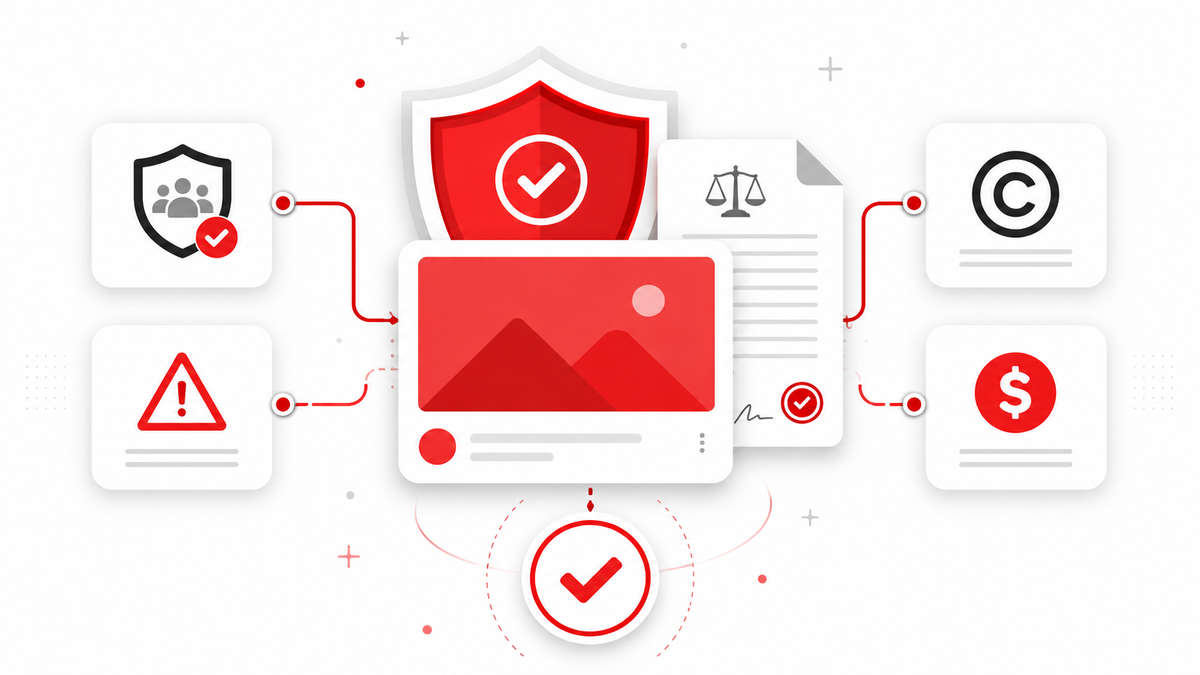
Community Guidelines are YouTube's content-specific rules: what's allowed to be uploaded and displayed on the platform, covering everything from violence and hate speech to spam and misleading practices. Community Guidelines explicitly apply to thumbnails, not just video content. This is worth underlining, because it's easy to assume content rules only govern what's inside a video, when in practice YouTube treats the thumbnail as content subject to the same standards.
Thumbnail-Related Responsibilities
Because thumbnails are covered under Community Guidelines, the same restrictions that apply to video content generally apply to the still image representing it. In practical terms, this means a thumbnail can be removed, and repeated or severe violations can result in a strike against the channel, independent of whether the video itself technically complies, if the thumbnail itself contains prohibited material.
Misleading Thumbnails and Deceptive Practices
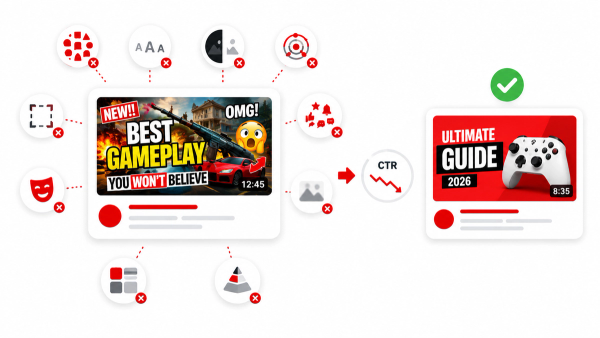
YouTube's spam and deceptive practices policies cover content designed to scam, mislead, or defraud viewers. This extends to what's sometimes informally called "clickbait": thumbnails or titles that promise something the video doesn't deliver. YouTube has stated it is increasing enforcement specifically against what it calls "egregious clickbait," where a thumbnail or title makes a promise, particularly around breaking news or current events, that the video's actual content doesn't fulfill. The company's own example describes a video titled around a major event (like a resignation) that never actually addresses that event; that kind of clear mismatch is the target of this enforcement, not ordinary curiosity-driven framing.
It's worth being precise here: not every attention-grabbing thumbnail is a policy violation. The concern is specifically a thumbnail or title that materially misrepresents what the video contains, not simply a thumbnail designed to be visually compelling or curiosity-inducing.
Graphic, Sexual, or Inappropriate Imagery
Thumbnails containing pornography, graphic violence, or other content YouTube's Community Guidelines prohibit in videos generally are treated the same way when they appear in thumbnail form. YouTube has specifically flagged that thumbnails egregiously violating these standards can result in immediate thumbnail removal and, depending on severity, a strike against the channel.
Copyright and Trademarks
A custom thumbnail is still subject to copyright rules like any other image you publish. Using someone else's photography, artwork, or another creator's original thumbnail design without appropriate rights raises the same copyright concerns as using unlicensed footage in a video. Similarly, using a trademarked logo or brand asset in a thumbnail in a way that could mislead viewers about sponsorship, endorsement, or affiliation may raise trademark concerns depending on the specific circumstances.
This applies even to elements that feel minor, such as using a screenshot from another creator's video as your thumbnail's background, or lifting a distinctive graphic treatment (a specific border style, badge, or icon set) that another channel has built its brand around. The safer default is building thumbnails from your own photography, your own graphics, or clearly licensed stock assets, rather than treating other creators' visual work as free-to-reuse material simply because it's visible on the platform.
Impersonation
Thumbnails (and channel branding generally) that impersonate another creator, public figure, or brand in a way designed to deceive viewers fall under YouTube's impersonation policies. This is distinct from parody or commentary that clearly isn't presenting itself as the genuine person or entity.
Impersonation
Thumbnails (and channel branding generally) that impersonate another creator, public figure, or brand in a way designed to deceive viewers fall under YouTube's impersonation policies. This is distinct from parody or commentary that clearly isn't presenting itself as the genuine person or entity.
Harmful or Dangerous Content in Thumbnails
Beyond graphic or sexual imagery, YouTube's Community Guidelines also restrict content that promotes dangerous activities, such as depicting dangerous stunts, challenges, or acts that could result in serious harm, in a way that encourages viewers to replicate them. A thumbnail that glorifies or instructs on dangerous behavior can be treated as a violation independent of how the surrounding video frames or contextualizes that same content. As with graphic imagery, an EDSA (educational, documentary, scientific, or artistic) exception may apply depending on the specific context, but this is evaluated case by case rather than being a blanket allowance.
Spam, External Links, and Fake Engagement
YouTube's broader spam and deceptive practices policies also cover related areas worth knowing about even though they're not thumbnail-specific: external links that lead to malicious or deceptive destinations, engagement manipulation (like incentivizing fake likes, views, or comments), and repetitive, low-value content designed purely to game recommendations or search. While these aren't primarily about thumbnails, a thumbnail can factor into a spam determination if it's used as part of a broader deceptive pattern, for example a thumbnail designed to look like an official platform notification or a fake giveaway announcement.
Community Guidelines vs. Monetization Standards
This is one of the more commonly confused distinctions, and it's worth separating clearly:
- Community Guidelines determine whether content is allowed on YouTube at all. Violations can lead to content removal, strikes, or in serious or repeated cases, channel termination.
- Advertiser-friendly content guidelines (part of YouTube's monetization policies) determine whether a video is eligible to run ads and earn revenue through the Partner Program. Content can fully comply with Community Guidelines, and therefore remain on the platform, while still being deemed unsuitable for advertising and getting limited or no monetization as a result.
A thumbnail or video can therefore face different outcomes for different reasons: it might stay up but earn reduced or no ad revenue (a monetization/advertiser-friendly issue), or it might come down entirely and affect the channel's standing (a Community Guidelines issue). Treating these as the same system leads to confusion about why a video is "fine" in one respect but flagged in another.
Enforcement: What Actually Happens
When a thumbnail violates Community Guidelines, YouTube's stated approach involves removing the offending thumbnail and, depending on the severity and history of the channel, may also issue a strike. Multiple strikes within a rolling period can lead to escalating restrictions and, in serious or repeated cases, channel termination. Exact thresholds, timelines, and specific enforcement mechanics are determined by YouTube's current policies, which are updated periodically, so creators should check YouTube's official Help Center for current specifics rather than relying on older assumptions about exact strike counts or timing.
Enforcement isn't only reactive. YouTube also relies heavily on automated systems to flag likely violations before a human reviewer gets involved, meaning a thumbnail can be actioned quickly, sometimes within hours of publishing, if it closely matches patterns the system has been trained to recognize as violating. This is part of why even a brief window of a policy-violating thumbnail being live can still result in enforcement; "it was only up for a short time" isn't generally treated as a mitigating factor on its own.
It's also worth noting that some content that would otherwise violate a guideline may remain on the platform under an educational, documentary, scientific, or artistic (EDSA) exception, which YouTube applies on a case-by-case basis depending on context.
Do Not Overstate These Policies
It's worth resisting the temptation, common in creator forums and older SEO content, to state enforcement in absolute terms. YouTube's own language around enforcement consistently uses qualifiers like "may," "can," and "depending on the circumstances," rather than guaranteeing a specific outcome for every violation. Claims like "one bad thumbnail always gets your channel banned" or "YouTube always removes thumbnails for X" overstate what YouTube's own documentation actually commits to. Enforcement depends on severity, context, channel history, and policies that are updated over time, none of which support flat, universal statements about outcomes.
How Creators Can Stay Compliant
A few practical habits reduce the risk of thumbnail-related issues:
- Make sure your thumbnail accurately represents your video's actual content, especially for anything touching news, current events, or a significant claim.
- Avoid using graphic, sexual, or violent imagery in a thumbnail even if similar imagery is discussed (not shown) in the video itself.
- Don't use another creator's original image, logo, or distinctive branding in your thumbnail without appropriate rights or permission.
- Don't design a thumbnail intended to make viewers believe it's from a different, more established channel or public figure.
- If a thumbnail is borderline, especially around sensitive current events, consider whether a viewer landing on the video with only the thumbnail and title as context would feel misled by what they actually find.
Practical Thumbnail Compliance Checklist
- Does the thumbnail accurately reflect what's actually discussed or shown in the video?
- Is the imagery free of graphic violence, sexual content, or other material that would violate Community Guidelines if it appeared in the video itself?
- Are all images, logos, and design assets either your own or properly licensed?
- Does the thumbnail avoid impersonating another creator, brand, or public figure?
- If the topic involves breaking news or a current event, does the video actually address what the thumbnail and title promise?
- Would you be comfortable with a viewer judging your channel's trustworthiness based on this thumbnail matching (or not matching) the video?
- Does the thumbnail avoid glorifying or instructing dangerous behavior, even if the video itself discusses the topic responsibly?
- If the thumbnail includes a face or identifying detail, has the person shown consented to its use, particularly if it isn't you?
Running through this list before publishing takes under a minute and catches the overwhelming majority of avoidable issues, since most thumbnail-related enforcement actions stem from a small, predictable set of causes: mismatched claims, graphic imagery, unauthorized assets, or impersonation.
Frequently Asked Questions
Do YouTube's Community Guidelines apply to thumbnails?
Yes. YouTube's Community Guidelines explicitly state that its policies apply to thumbnails, not just video content, meaning a thumbnail can be removed or trigger a strike the same way a video itself could.
Can YouTube remove just my thumbnail without removing the video?
Yes, this is a stated enforcement approach for thumbnails that violate policy: YouTube can remove the offending thumbnail specifically, sometimes without necessarily removing the entire video, depending on the nature and severity of the violation.
What counts as a misleading thumbnail?
Broadly, a thumbnail (often combined with the title) that promises something the video's content doesn't actually deliver, particularly around breaking news or major claims. Ordinary attention-grabbing design isn't the target; a clear mismatch between what's promised and what's shown is.
Is using a copyrighted image in my thumbnail against YouTube's rules?
It can raise copyright concerns depending on the specific image and how it's used, similar to using unlicensed footage in a video. Using your own original images, or properly licensed stock imagery, avoids this risk entirely.
Will one policy violation get my channel terminated?
Not necessarily. Enforcement generally scales with severity and repetition; a single, less severe violation is typically handled differently than repeated or egregious violations. Specific thresholds and processes are set by YouTube's current policies, which can change, so check YouTube's official documentation for up-to-date specifics.
What's the difference between a Community Guidelines violation and losing monetization?
A Community Guidelines violation concerns whether content is allowed on the platform at all and can lead to removal or strikes. A monetization or advertiser-friendly issue concerns whether a video can earn ad revenue; a video can remain up while still being limited or ineligible for ads under separate advertiser-friendly standards.
Where can I find YouTube's current official thumbnail policy?
YouTube's Help Center hosts its current Community Guidelines, including the specific policies referenced here (spam and deceptive practices, impersonation, and sensitive content policies covering thumbnails). Since policies are updated periodically, checking the official source directly is the most reliable way to get current specifics.