Table of Contents
- Introduction
- What Is a YouTube Ad Revenue Calculator?
- The Formula Behind Every YouTube Revenue Calculator
- Why the Calculator Uses RPM Instead of CPM
- What Inputs Matter Most
- Estimates Per Video, Per 1,000 Views, and Per Year
- How Accurate Are YouTube Revenue Estimates?
- Long-Form vs Shorts in Your Estimate
- Common Mistakes When Estimating Revenue
- When a Calculator Estimate Is Wrong
- Try the Free Thumbix YouTube Ad Revenue Calculator
- Beyond Ads: Non-Ad Revenue to Consider
- Frequently Asked Questions
- How to Estimate Views and RPM Before You Have Data
- A Worked Example: A New Channel Projection
- Estimating for a Single Video vs a Whole Channel
- What the Calculator Can't Do
- Conclusion
A YouTube ad revenue calculator turns view counts into realistic earnings estimates. Here's exactly how it works, what to enter, and why estimates are never guarantees.
Introduction
A video hits 50,000 views and you think: "How much money is that?" Or you're planning a channel launch and want to know what 500,000 monthly views could realistically produce. A YouTube ad revenue calculator answers that question in seconds — provided you understand what goes into the calculation and what the number really means. This guide explains how YouTube revenue estimation works, what to enter into a calculator for honest results, and where estimates break down. Along the way, you'll learn why RPM matters more than views, how to compare long-form and Shorts, and how to use the free Thumbix calculator to project earnings per video, per 1,000 views, and across a full year.
What Is a YouTube Ad Revenue Calculator?
A YouTube ad revenue calculator is a tool that converts your views and RPM into an estimated earnings figure. You enter two or three numbers, and it applies the same basic formula YouTube's own data supports to give you a projection. The output is usually broken down in a few ways:
- Earnings for a specific video
- Earnings per 1,000 views
- Projected monthly or yearly revenue
The purpose isn't to promise a check. It's to give you a planning number — a defensible estimate you can use to decide whether a channel is worth your time, what your content strategy should prioritize, and when you might reach meaningful income.
The Formula Behind Every YouTube Revenue Calculator
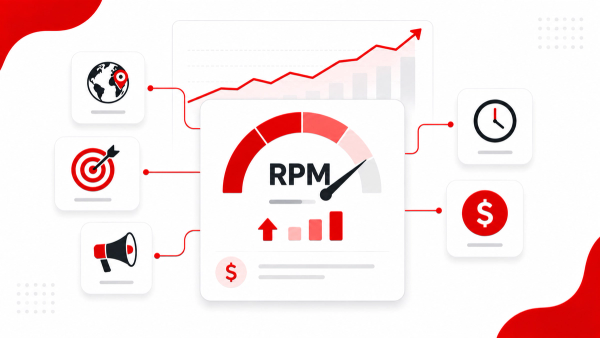
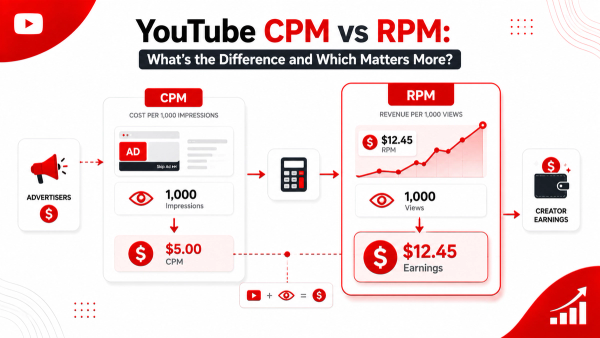
The core formula, used by the Thumbix calculator and the wider creator community, is: Estimated earnings = Views ÷ 1,000 × RPM RPM stands for revenue per mille — the amount you earn per 1,000 views, after YouTube's revenue share. It's the single most accurate summary of your ad earnings that YouTube gives you, because it already accounts for the messy details underneath:
- How many views actually served an ad
- What advertisers paid for your audience
- YouTube's share of the revenue
- Where your audience is located
When you enter an RPM into a calculator, you're telling it "my channel earns this much per 1,000 views" and letting it do the multiplication from there.
Why the Calculator Uses RPM Instead of CPM
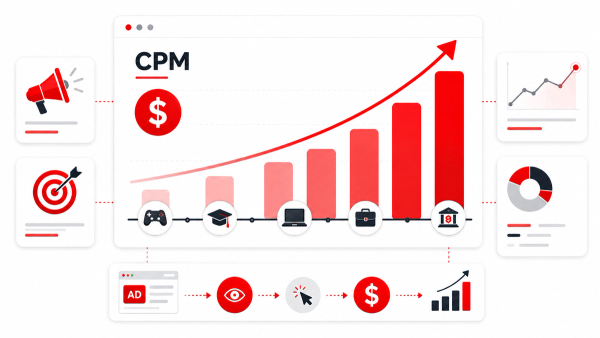
CPM (cost per mille) is what advertisers pay. RPM is what you earn. The two are often confused, and the difference matters because a large chunk of the advertiser payment never reaches you. YouTube takes a share, and only a fraction of your views serve ads at all. A calculator built on RPM is honest by construction. It measures what lands in your account, not what advertisers spend. If you don't know your RPM, use the Thumbix RPM Calculator first, or pull it from the Monetization tab in YouTube Studio — it's the exact figure YouTube reports for your channel.
What Inputs Matter Most
The quality of your estimate depends on the quality of your inputs. The most important ones: Views. Use the real number from Studio for a video, or an average monthly view count for your channel. Don't use your public counter if you have a precise Studio number — public views aren't always monetized views. RPM. Your channel's actual RPM from the last 90 days is the gold standard. If you don't have one yet, use a niche-based estimate. Finance channels can see RPMs above $10; gaming and entertainment often sit between $1 and $4. Audience country. Audience location heavily shapes RPM. If your traffic is mostly in the US, your RPM will run higher than a channel drawing viewers from lower-CPM markets. Good calculators let you adjust this by letting you set your own RPM. Fill rate. Not every view serves an ad. Your RPM already folds in your fill rate, which is why entering RPM (not CPM) is the right move.
Estimates Per Video, Per 1,000 Views, and Per Year
The most useful calculators break the estimate into three windows, because each answers a different question. Per 1,000 views — the purest number. If your RPM is $5, you earn $5 for every 1,000 monetized views. This is the baseline for comparing videos, niches, and formats. Per video — multiply your video's views by your RPM. A 100,000-view video at a $5 RPM produces roughly $500. Per year — project your monthly average forward. If you average 300,000 views a month at a $5 RPM, that's $1,500 a month and about $18,000 a year from ads alone. This is the planning number most creators actually want.
How Accurate Are YouTube Revenue Estimates?
Estimates are directionally accurate, not exact. The formula is the right formula — YouTube's own RPM data confirms it — but the inputs drift. RPM moves with season, audience, and content. Views fluctuate month to month. A calculator captures the relationship at the moment you enter the numbers. Treat a calculator like a map: it shows the shape of the terrain, not every pebble. The closer your inputs are to reality, the closer the output will be.
Long-Form vs Shorts in Your Estimate
Shorts change the math. Shorts monetize through a pooled revenue model — a shared pool divided among eligible Shorts based on each channel's share of total Shorts watch time — not through per-video ads. The practical effect: Shorts RPM is dramatically lower, often around $0.03 to $0.10 per 1,000 views. If you're estimating a channel with both formats, do them separately. Enter long-form views with a long-form RPM, and Shorts views with a Shorts RPM, rather than mixing everything into one average that misrepresents both.
Common Mistakes When Estimating Revenue
- Using CPM instead of RPM. You'll overestimate by the size of YouTube's share and your fill rate.
- Using total views instead of monetized views. Public counters include views that never served an ad.
- Applying one RPM to everything. A 10-minute finance video and a 45-second Short shouldn't share a rate.
- Forgetting the $100 payout threshold. AdSense only pays out once you cross $100, and typically on a monthly schedule.
- Treating estimates as guarantees. Seasonality and ad demand mean last month's RPM isn't next month's.
When a Calculator Estimate Is Wrong
If your actual Studio numbers consistently beat your estimate, the most likely causes are a stronger audience country mix, higher retention, or better fill rate than you assumed. If your estimate beats reality, the usual culprits are CPM-vs-RPM confusion or counting non-monetized views. In both cases, the fix is the same: pull your real RPM from Studio and re-run the numbers.
Try the Free Thumbix YouTube Ad Revenue Calculator
The Thumbix calculator is built around this exact formula. Enter your views and RPM, choose your format, and you'll see estimated earnings per video, per 1,000 views, and projected per year. For a deeper per-video read, pair it with the Revenue Per Video Calculator; to confirm your RPM from past earnings, use the RPM Calculator; and to understand the advertiser side, check the CPM Calculator.
Beyond Ads: Non-Ad Revenue to Consider
Ad revenue is the foundation, but most successful channels layer more on top:
- Sponsorships — often worth 2–5 times your average ad RPM per video
- Affiliate marketing — commissions from products you genuinely recommend
- Digital products — courses, templates, presets, or ebooks
- Memberships and channel perks — recurring revenue from your biggest fans
- Brand deals and licensing — for channels with recognizable formats
A calculator shows you the ad baseline. Your real ceiling is usually much higher.
How to Estimate Views and RPM Before You Have Data
New channels don't have an RPM yet, which makes any estimate feel like a guess. You can still build a defensible projection:
- Start with niche benchmarks. Use the typical RPM for your niche from this guide and similar sources. Finance channels can reasonably project higher RPMs; gaming and entertainment should project low.
- Estimate views from the plan, not hope. Count your realistic uploads per month and the average views you can expect per video at your channel's stage — small channels often see a few hundred to a few thousand views per video early on.
- Update as you get real data. After 30 days of monetized views, replace the assumptions with your actual Studio RPM. The projection improves every cycle.
An estimate built from a plan is honest; an estimate built from a dream is fiction. Start conservative and refine.
A Worked Example: A New Channel Projection
Say you're launching a tech channel. You plan 8 uploads a month, expect an average of 4,000 views per video in year one, and use a $7 RPM from the tech niche band. Monthly views: 8 × 4,000 = 32,000. Monthly ad revenue: 32,000 ÷ 1,000 × $7 = $224. Per year: roughly $2,700 from ads alone. Now change one number — the average views per video doubles to 8,000. Monthly revenue doubles to $448. Or drop the RPM to $4 and the original projection falls to $128 a month. The point isn't that your forecast will be exact; it's that you can see exactly which assumption moves the needle, and focus your energy there.
Estimating for a Single Video vs a Whole Channel
The same formula works at both levels, but the inputs differ. For a single video, use the actual view count and a format-matched RPM. For a channel, use monthly totals and a 90-day average RPM. Mixing the two is where estimates go wrong: a video estimate tells you about one piece of content, while a channel estimate tells you about a system. Use each for its purpose and the numbers stay coherent.
What the Calculator Can't Do
A revenue calculator is precise about the formula and silent about everything else. It can't tell you whether your RPM will hold next quarter, whether a sponsor would pay more than ads, or whether your audience will double. It also can't see your real fill rate or account for the videos you'll make three months from now. Treat the output as the ad-revenue baseline of a plan — then build the plan around the things the calculator doesn't know: sponsorships, products, retention improvements, and the content decisions that actually move your views.
Conclusion
A YouTube ad revenue calculator is a planning tool, and a good one. Feed it honest inputs — real views, a realistic RPM, the right format — and it will show you what your channel's ad revenue looks like per video, per 1,000 views, and per year. Feed it guesses and it will happily guess back. Get the numbers right, and you can finally answer the question every creator asks: what is my content actually worth? Ready to see the number? Plug your views and RPM into the free Thumbix YouTube Ad Revenue Calculator — no account, no cost, no fluff.
Frequently Asked Questions
How do I calculate YouTube ad revenue?
Use the formula views ÷ 1,000 × RPM. Or use the free Thumbix YouTube Ad Revenue Calculator, which shows earnings per video, per 1,000 views, and per year.
What is RPM and why does the calculator use it?
RPM (revenue per mille) is what you earn per 1,000 views after YouTube's share. It's more accurate than CPM because it already accounts for fill rate and revenue share.
How accurate is a YouTube revenue calculator?
Directionally accurate, not exact. Estimates are only as good as your RPM and view inputs, and RPM fluctuates with season, niche, and audience.
Do Shorts earn the same as long-form per view?
No. Shorts use a pooled revenue model and typically earn $0.03–$0.10 per 1,000 views, far below long-form.
What is a good RPM to enter into a calculator?
Use your actual RPM from the Monetization tab in YouTube Studio. If you don't have one, a niche estimate of $4–$8 for long-form is reasonable; finance can exceed $10.
Why does my estimated revenue differ from YouTube Studio?
The most common reasons are using CPM instead of RPM, counting non-monetized views, or applying one RPM across different formats.