Table of Contents
- What Thumbnail CTR Actually Means
- How Impressions Work
- CTR Is Not the Same as Overall Video Success
- The Thumbnail-Title-Topic Relationship
- Thumbnail Composition Fundamentals
- Visual Hierarchy and Contrast
- Color
- Faces and Emotion
- Curiosity Without Misleading
- Text and Typography
- Simplicity and Mobile Readability
- Where Impressions Come From
- CTR Changes Over a Video's Lifetime
- Why There's No Universal "Good" CTR Number
- A Practical Optimization Framework
- Step 1 -- Establish a Baseline
- Step 2 -- Identify Weak Videos
- Step 3 -- Diagnose the Problem
- Step 4 -- Create New Thumbnail Concepts
- Step 5 -- Test
- Step 6 -- Measure Properly
- Step 7 -- Document What You Learn
- Step 8 -- Apply the Pattern Forward
- Common Optimization Mistakes
- Thumbnail Audit Checklist
- New Viewers Versus Returning Viewers
- Reading YouTube Studio Analytics for Thumbnail Insights
- Frequently Asked Questions
A practical, testable framework for improving thumbnail CTR through design, context, and YouTube Studio's own analytics and A/B tools.
Two videos on the same channel, covering similar topics, uploaded a week apart -- one gets a 2% click-through rate and quietly disappears from recommendations, the other hits 8% and snowballs into tens of thousands of views. The footage quality was comparable. The difference sat almost entirely in the thumbnail and title, and in how well they matched what the audience actually wanted to see.
This guide walks through what thumbnail CTR actually measures, how it fits into YouTube's broader recommendation system, and a practical, repeatable process for testing and improving it -- without resorting to misleading clickbait that tanks retention and damages a channel long-term.
What Thumbnail CTR Actually Means
Click-through rate is the percentage of people who saw your thumbnail (an impression) and clicked on it. If YouTube showed your video's thumbnail to 1,000 people and 60 of them clicked, that's a 6% CTR for that batch of impressions. It's reported in YouTube Studio Analytics under the Reach tab, broken down by traffic source and by time period.
CTR is a signal, not a scoreboard. It tells you how compelling your thumbnail and title were to the specific audience that saw them, in the specific context they saw them in. It says nothing on its own about whether those viewers stayed, enjoyed the video, or came back.
How Impressions Work
An impression is counted when YouTube displays your thumbnail somewhere a viewer could plausibly see and click it -- the homepage feed, the Up Next / suggested videos panel, search results, or a channel page. Not every impression is equal: a thumbnail shown prominently on the homepage to a returning subscriber behaves very differently from the same thumbnail shown as a small suggested-video tile to someone who has never seen your channel.
This is exactly why raw CTR numbers can't be compared across videos, channels, or traffic sources without a lot of context. A 4% CTR from cold browse traffic and a 4% CTR from your own subscribers driven by a notification are not the same achievement.
CTR Is Not the Same as Overall Video Success
A thumbnail that gets clicked by the wrong audience can produce a high CTR and a terrible watch-time outcome, because viewers who clicked expecting one thing bounce quickly when the video delivers another. YouTube's systems increasingly weigh what happens after the click -- average view duration, audience retention, and whether viewers watch more of your content afterward -- alongside CTR itself. A thumbnail strategy built purely to maximize clicks, disconnected from what the video actually delivers, tends to underperform over time even if early CTR numbers look good.
The Thumbnail-Title-Topic Relationship
A thumbnail rarely works in isolation. It's evaluated alongside the title, and both are evaluated against the underlying topic's demand and the specific audience segment seeing it. Three things need to align:
- Audience expectations -- what does the person scrolling actually want, based on what they've watched before?
- Topic strength -- is this a subject people are actively searching for or interested in right now?
- Thumbnail and title together -- do they create a clear, honest reason to click, without simply repeating each other word for word?
When a thumbnail and title say exactly the same thing ("I Tried X For 30 Days" as the title, with the same phrase pasted across the thumbnail), you lose an opportunity. The strongest combinations create a small information gap -- the thumbnail shows something, the title adds a different piece of information, and together they raise a specific question the viewer wants answered.
Thumbnail Composition Fundamentals
Visual Hierarchy and Contrast
The human eye should land on one clear focal point within a fraction of a second. That usually means one dominant subject (often a face, sometimes an object central to the video's premise), a background that doesn't compete with it, and enough contrast between subject and background that the image reads clearly even at a small size.
Color
Color choices matter less as a matter of "best colors" and more as a matter of separation and consistency. A thumbnail needs to stand out against the neutral white and dark-mode backgrounds of the YouTube interface, and against the thumbnails of nearby suggested videos, which are very often other creators in your own niche using similar visual conventions.
Faces and Emotion
Faces showing clear, legible emotion are a reliable attention magnet because human vision is wired to prioritize faces. This doesn't mean every thumbnail needs an exaggerated reaction shot -- it means that if a face is present, its expression should be unambiguous at a glance and should genuinely reflect the content of the video.
Curiosity Without Misleading
Good thumbnails create a specific, answerable question -- not vague mystery for its own sake, and not a promise the video doesn't keep. "What happens when..." works because the video answers it. A thumbnail implying an outcome that never occurs in the video is a fast path to poor retention and audience distrust, even if it briefly inflates CTR.
Text and Typography
If you use on-thumbnail text, keep it short -- a handful of words, not a sentence -- and make sure it's legible at the size a thumbnail actually appears: a small tile on a phone screen, often under two inches wide. Bold, high-contrast lettering with generous spacing survives that shrinkage; thin fonts and long phrases don't.
Simplicity and Mobile Readability
Most YouTube viewing happens on mobile devices, where thumbnails render small. Test your thumbnail at actual mobile size, not just full-screen on a desktop monitor while designing it. If you can't tell what it's about from across a room, it's probably too cluttered.
Where Impressions Come From
YouTube Studio breaks CTR down by traffic source, and the sources behave differently:
- Home / browse features -- viewers who aren't actively searching; thumbnail and topic appeal carry the most weight here.
- Suggested videos -- shown next to or after another video, so context (what they were just watching) matters a lot.
- YouTube Search -- viewers with an explicit, specific intent; title relevance and search-matching often outweigh visual flash.
- External traffic -- from links, social posts, or embeds, where the thumbnail may be the very first thing that determines whether someone clicks at all.
- Notifications and subscriptions -- returning viewers who already trust the channel, where thumbnail novelty matters less than topic interest.
A thumbnail optimized purely for cold browse traffic might underperform in search results, where a clear, descriptive, keyword-relevant title paired with a straightforward thumbnail often wins over something designed purely to grab attention.
CTR Changes Over a Video's Lifetime
CTR for a given video is rarely stable. It often starts high among a channel's most engaged subscribers in the first hours after publishing, then shifts as the video gets distributed more broadly to colder audiences, and can shift again months later if the topic becomes newly relevant or the video gets picked up by a new recommendation cluster. Judging a thumbnail's performance from only its first day of data can be misleading in either direction.
Why There's No Universal "Good" CTR Number
Any claim along the lines of "anything above X% is good" should be treated with suspicion. CTR benchmarks genuinely vary by niche (gaming, tutorials, vlogs, and news all behave differently), by channel size and subscriber trust, by traffic source mix, by video age, by topic saturation, and by whether a video is being pushed heavily through browse features or found mostly through search.
The more useful comparison is a video against your own channel's recent baseline, or a specific thumbnail against a specific alternative for the same video through a controlled test -- not against an arbitrary industry number pulled from a blog post.
A Practical Optimization Framework
Step 1 -- Establish a Baseline
Before changing anything, look at your last 10-20 videos in YouTube Studio Analytics and note the typical CTR range for your channel, broken out by traffic source where possible. This baseline is your actual point of comparison going forward.
Step 2 -- Identify Weak Videos
Look for videos whose CTR sits noticeably below your baseline despite reasonable impression volume. Low impressions plus low CTR usually points to a different problem (distribution, not the thumbnail); reasonable impressions plus low CTR is a stronger signal that the thumbnail and title aren't earning the click.
Step 3 -- Diagnose the Problem
Ask specifically what's likely wrong: is the subject unclear at a glance, does the thumbnail look like ten others in the same niche, is the title redundant with the thumbnail, or does the topic itself simply have limited pull right now? Different diagnoses call for different fixes.
Step 4 -- Create New Thumbnail Concepts
Design two or three genuinely distinct alternatives -- not minor color tweaks, but different focal points, different emotional angles, or a different information gap between thumbnail and title. Testing near-identical variants wastes a test cycle without producing a useful answer.
Step 5 -- Test
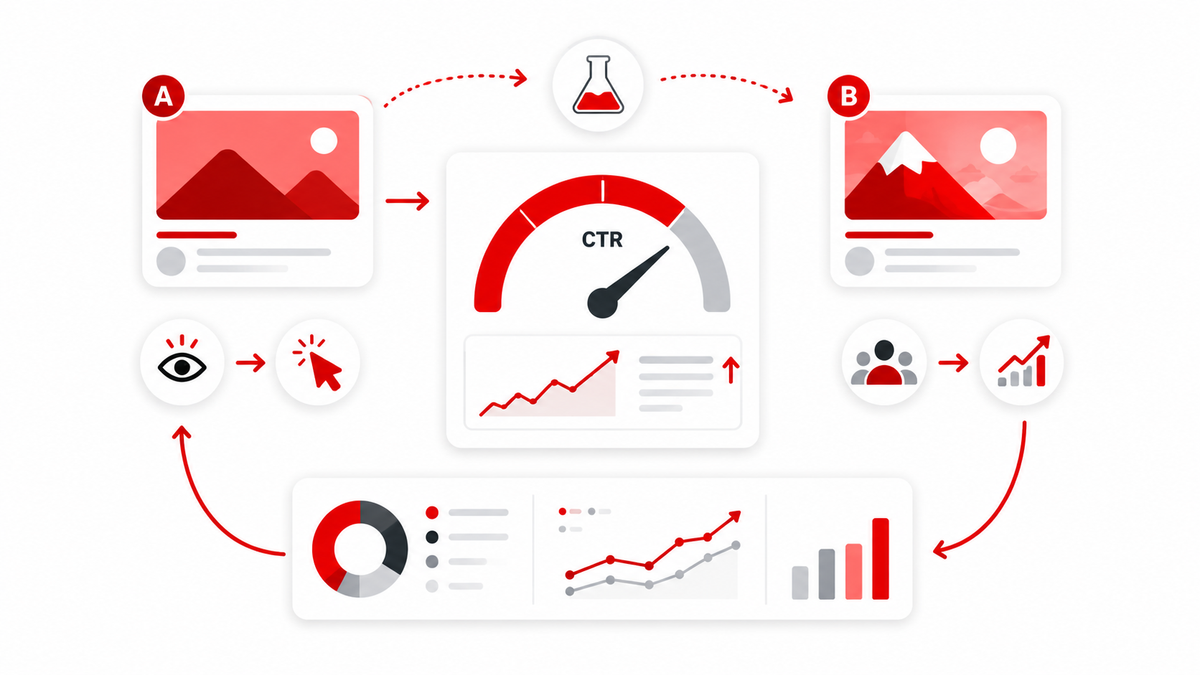
Where available, use YouTube Studio's built-in A/B testing tool (Test & Compare) to test up to three thumbnails directly on a live or newly published video. It's accessible from the details screen for eligible channels, and it determines a winner based primarily on watch time rather than clicks alone, which helps avoid rewarding a thumbnail that gets clicks but disappoints viewers. Availability and eligibility requirements have expanded over time, so check YouTube Studio directly to confirm current access for your channel.
Step 6 -- Measure Properly
Let a test run long enough to reach a meaningful sample size rather than judging results after a few hours. Watch both CTR and downstream metrics like average view duration -- a variant that wins on clicks but loses on watch time isn't necessarily the better choice.
Step 7 -- Document What You Learn
Keep a simple running log of what you tested and what happened. Patterns emerge over many tests that aren't obvious from any single result -- for example, discovering that your audience consistently responds better to expressive faces than to text-heavy thumbnails.
Step 8 -- Apply the Pattern Forward
Use validated patterns as a starting point for future thumbnails, while still treating each new video on its own merits. A pattern that worked for one topic won't automatically transfer to every future upload.
Common Optimization Mistakes
- Chasing clickbait that inflates CTR but tanks retention and viewer trust over time.
- Testing only minor variations (a slightly different crop) instead of genuinely different concepts.
- Judging a test too early, before reaching a reliable sample size.
- Comparing CTR across different traffic sources as if they're the same measurement.
- Copying a competitor's exact visual style so closely that your thumbnails become indistinguishable from theirs in a shared feed.
- Ignoring how the thumbnail actually looks at real mobile size.
- Treating a single low-CTR video as proof of a broken thumbnail strategy, rather than one data point among many.
Thumbnail Audit Checklist
- Can the subject be understood almost instantly, without reading any text?
- Is there one obvious focal point, or is attention split across several elements?
- Is any on-thumbnail text legible at actual mobile size?
- Does the thumbnail complement the title rather than simply repeating it?
- Is there unnecessary clutter that could be removed?
- Is there strong contrast between the subject and the background?
- Does it create genuine curiosity without misrepresenting the video?
- Does the visual style match what the target audience actually responds to?
- Does it look distinct from the other thumbnails currently surrounding it in search or suggested feeds?
- Is the visual hierarchy -- what the eye sees first, second, and third -- intentional?
New Viewers Versus Returning Viewers
CTR behaves differently depending on whether the person scrolling already knows your channel. Returning viewers and subscribers click based on accumulated trust -- they've liked your past videos, so a slightly weaker thumbnail can still convert. New viewers have no such history; the thumbnail and title are doing all the persuasive work in that split second, with no accumulated goodwill to lean on. A channel in growth mode, trying to reach new audiences, generally benefits from paying closer attention to how thumbnails perform specifically with cold, non-subscribed traffic rather than blended totals.
Reading YouTube Studio Analytics for Thumbnail Insights
The Reach tab in YouTube Studio Analytics is the primary place to evaluate thumbnail performance. Beyond the headline CTR number, it's worth reviewing impressions volume (a thumbnail can't be judged fairly on a tiny sample), the traffic source breakdown described above, and how CTR trends over the days and weeks after publishing rather than just the current snapshot. Comparing a video's performance against your channel's own recent average, filtered to a similar traffic source mix, gives a far more honest read than comparing it to an unrelated video with a completely different distribution pattern.
Frequently Asked Questions
What is a good CTR for a YouTube thumbnail?
There's no single universal number. A useful CTR depends on your niche, channel size, traffic source mix, and video age. Compare a video against your own channel's recent baseline rather than an outside benchmark.
Does a higher CTR always mean a better thumbnail?
Not necessarily. A thumbnail can inflate clicks from the wrong audience, which often hurts watch time and retention. YouTube's systems weigh what happens after the click, not just whether it happened.
How do I A/B test a YouTube thumbnail?
Eligible channels can use YouTube Studio's built-in Test & Compare feature to upload up to three thumbnail variants for a video and let YouTube determine a winner, typically based on watch time performance. Check your Studio dashboard to confirm current eligibility.
Why is my thumbnail CTR dropping over time?
CTR often declines naturally as a video moves from an engaged subscriber audience toward colder, broader distribution. It can also shift if a topic loses relevance or gets displaced by newer, similar content in recommendations.
Should my thumbnail and title say the same thing?
Generally, no. Strong pairs create a small, honest information gap between the thumbnail and the title rather than repeating identical information, which gives the viewer an actual reason to click.
Does thumbnail text hurt or help CTR?
It depends on execution. Short, legible, high-contrast text can add clarity; long sentences or thin fonts often become unreadable at small sizes and add clutter instead of clarity.
How long should I run a thumbnail test before judging results?
Long enough to reach a statistically meaningful sample of impressions -- judging results after only a few hours risks reacting to noise rather than a real signal.
Does CTR matter more than watch time for growth?
Both matter, but they measure different things. CTR reflects how compelling the thumbnail and title were; watch time and retention reflect whether the video delivered on that promise. Sustainable channel growth generally depends on both working together, not on maximizing CTR in isolation.
Why does the same thumbnail perform differently across videos?
Because CTR isn't purely a property of the image -- it's the combined effect of the thumbnail, the title, the topic's current demand, the audience segment seeing it, and the traffic source mix, all of which vary from video to video.