Table of Contents
- Introduction
- Why Repurposing Is the Cheapest Growth Engine
- Step 1: Find the High-Retention Moments
- Step 2: Edit Hook-First
- Step 3: Cut to 60 Seconds and 9:16
- Step 4: Add Captions People Can Read
- Step 5: Package the Short (Title and Description)
- Step 6: Publish, Link, and Repeat
- The Step-by-Step Workflow Table
- Shorts Monetization: What Repurposed Shorts Earn
- Common Repurposing Mistakes to Avoid
- Frequently Asked Questions
- Final Takeaway
Your long-form library is a pile of unused Shorts material. Here is the 2026 clipping workflow: find high-retention moments, edit hook-first with captions, respect the 60-second and 9:16 rules, and let Shorts feed your long-form income.
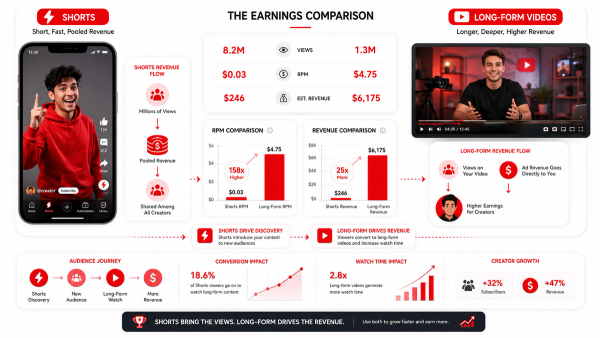
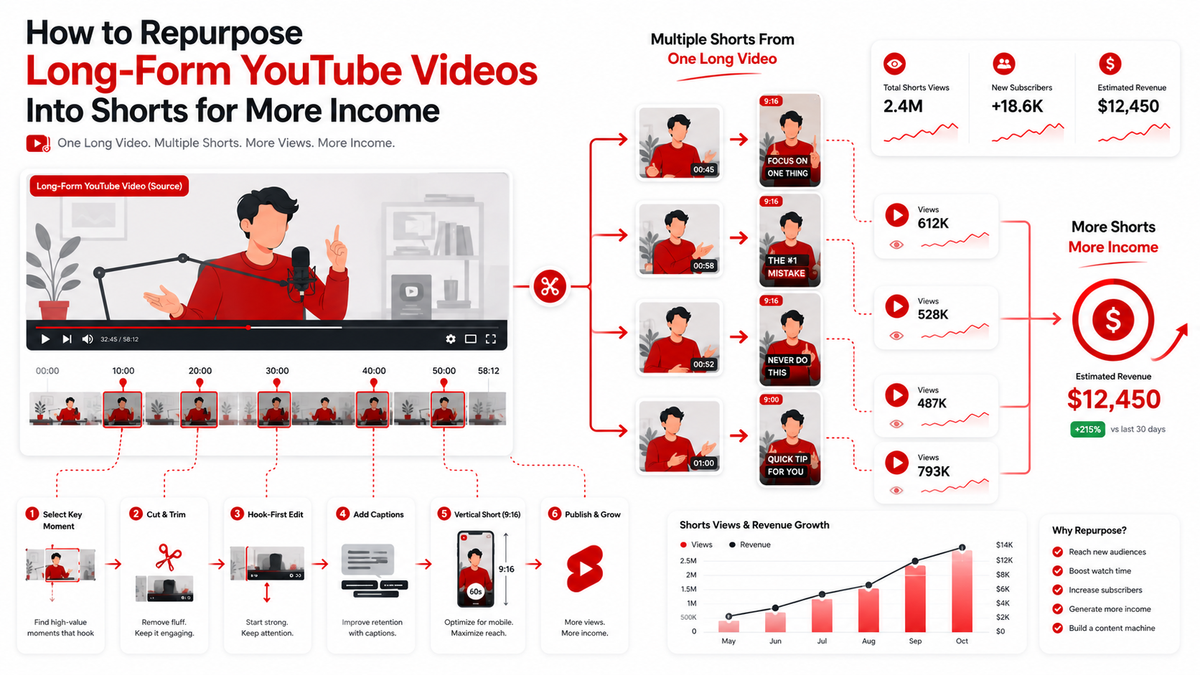
Every long-form video you publish contains several Shorts, and most creators throw them away. Repurposing is the cheapest growth engine on YouTube in 2026: you take a video you already made, cut it into short vertical clips, and let those clips pull new viewers into your channel and your long-form videos. Shorts typically earn only $0.03 to $0.15 per 1,000 views, so the income from repurposing is real but indirect; the bigger return is the subscribers and the long-form watch time the Shorts generate. This article walks through a complete clipping workflow: how to find the right moments, edit hook-first, respect the 60-second and 9:16 rules, format captions viewers can actually read, package the Short properly, and run the numbers on what repurposing is worth.
Introduction
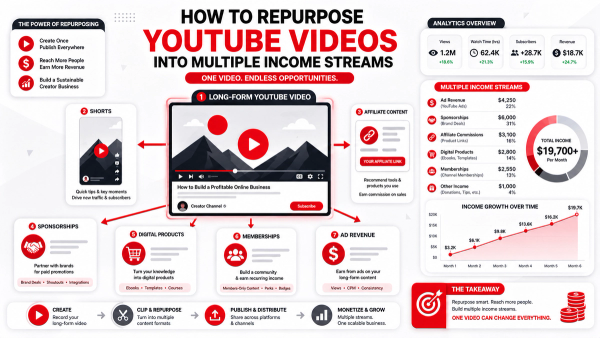
The repurposing playbook has one core idea: your library is an asset that keeps producing, and Shorts are the cheapest way to put it to work. A single long-form video can yield three to five distinct Shorts, each aimed at a different audience segment, and each of those Shorts is a doorway into your channel. The production cost is low because the footage already exists; the work is selection and editing, not creation. The honest caveat is the same one this site repeats everywhere: Shorts are not an income strategy on their own. Their job is discovery and subscriber growth, which feeds the long-form videos where the real RPM lives. If you measure repurposing only by the few dollars a Short earns directly, you will miss the whole point. The workflow below is built around that reality.
Why Repurposing Is the Cheapest Growth Engine
Compare repurposing with any other growth tactic and the economics are obvious. You already spent the hours scripting, recording, and editing the long-form video; the marginal cost of a Short cut from it is minutes, not hours. No new research, no new script, no new voiceover. Just selection, trimming, captions, and a thumbnail frame. Shorts also reach people your long-form never will. The Shorts feed serves vertical video to massive audiences regardless of whether they are subscribed, which makes every repurposed clip a cheap acquisition ad. A fraction of those viewers subscribe, and the subscribers are worth more than the Shorts revenue itself, because they create the long-form watch time that drives RPM-based income. There is one condition that makes the whole engine work: the Short must be genuinely good. A lazy re-upload of a mid-video moment with no hook and no captions performs like what it is. The workflow below exists to make sure your Shorts are not that.
Step 1: Find the High-Retention Moments
Do not guess which moments to clip; read your retention graph. In YouTube Studio, open the long-form video's Audience Retention report and look for two things: spikes and plateaus. A spike is a moment that made viewers perk up. A plateau that holds for ten seconds is a self-contained mini-story. Those are your Shorts. The best Shorts come from moments that work without context: a strong claim, a surprising fact, a clear step, a satisfying reveal, or a question the video then answers. If a moment needs three minutes of setup to make sense, it is not a Short; it is a summary. For faceless and educational content, the highest-retention moment is usually a concrete demonstration or a payoff reveal, so prioritize those. Pick three to five moments per long-form video and mark their timestamps before you open the editor. Selecting first, editing second, keeps you from drifting into hours of aimless cutting.
Step 2: Edit Hook-First
The single biggest difference between a repurposed Short that flops and one that pops is the hook. Long-form can afford a slow build; a Short cannot. Viewers decide in the first one to two seconds whether to stay, so your Short must open on the most interesting beat, not the setup. A hook-first edit means you lead with the peak moment, then, if the viewer needs context, give it in compressed form. Do not front-load a title or a logo animation; the first frame is the most expensive real estate on YouTube, and wasting it on branding is the most common repurposing mistake. Start on the action or the claim, add a caption that repeats the claim, and earn the rest of the view. The structure that works consistently is a promise, a payoff, and a door. Open with the strongest line, deliver the value fast, and end with a reason to watch the long-form video, either spoken in the clip or written on screen.
Step 3: Cut to 60 Seconds and 9:16
In 2026, Shorts can be up to 60 seconds long (the limit changed in October 2025), and they must be vertical 9:16. Two practical consequences follow. First, you have more room than a 15-second format allowed, which means an entire segment of your long-form can fit in one Short without a brutal cut. But the retention bar rises with length, so treat 45 to 55 seconds as the sweet spot and cut ruthlessly within it. If a moment works in 20 seconds, do not stretch it to 50 just because you can. Second, the 9:16 crop needs a decision, not a default. Set your safe area before you start, because 9:16 crop of a 16:9 video loses the edges of the frame. Keep your subject and any on-screen text inside the vertical safe zone, or your captions and faces will be cut off on phones. Most editors let you reframe shots, which is worth doing for the moments that matter most. Before you export, run the clip through the Shorts Duration Calculator to confirm it sits inside the 60-second limit, because a clip that crosses the boundary silently becomes long-form and loses its Shorts distribution.
Step 4: Add Captions People Can Read
Captions are not an optional add-on for Shorts; they are the script. Most viewers watch with sound off, and a Short without readable captions loses them in seconds. The standard is accuracy plus line breaks: captions that mirror the words in short, readable chunks rather than blocks of text. Format captions in two-to-four-word lines that match the rhythm of the narration, and keep them positioned within the safe area so they are not cut off or hidden behind interface elements. Styling matters less than legibility; high contrast against the footage beats fancy effects every time. The Shorts Caption Formatter turns your transcript into cleanly broken caption lines, which saves the most tedious part of the whole workflow and keeps your output consistent. Time the captions to the speech with the same pacing rules as the edit: the caption should pop when the word lands, not a beat later. Accurate, well-timed captions are also a quality signal that separates professional repurposed Shorts from content-farm reuploads.
Step 5: Package the Short (Title and Description)
Shorts packaging follows different rules than long-form, and the small surface area makes every character count. The title is the first thing viewers see in the feed, so write it as a hook or a searchable phrase, whichever the moment supports. Since Shorts titles can be longer than long-form titles in the UI, you have room for a full phrase, but the first line is what matters. The description works as a caption block: the first line is what shows in the Shorts feed, so put the strongest line or a call to action there. Use the description to point to the full video with the link, and add the relevant hashtags. Before publishing, run your title through the Shorts Title Checker to confirm it fits the limits and reads well truncated, because an awkwardly cut title costs clicks on a format where every click is expensive. For repurposed Shorts specifically, make the connection to the source video explicit in the description. It helps viewers trust the content and find the long-form, and it keeps your library coherent instead of random.
Step 6: Publish, Link, and Repeat
The publish step decides whether a good Short becomes growth or just a number. Post the Short at a time your target audience is active, and immediately pin a comment or add an end screen that points to the full long-form video. The link matters more than the Short's own view count, because the subscriber and watch-hour conversion is the return on your work. Build the workflow as a batch, not a series of one-offs. Set aside a repurposing session after every long-form upload, produce the three to five Shorts in one sitting, and schedule them across the following days. Batching turns repurposing from a chore into a system, which is the only version of it that survives contact with a real upload schedule. Track the funnel loosely: which Shorts produced subscribers, which sent viewers to long-form, and which formats held retention. After ten Shorts you will know what your audience clips well, and you will choose future long-form moments with repurposing in mind.
The Step-by-Step Workflow Table
Here is the whole workflow as a repeatable checklist.
- 1: Read the retention graph and mark 3-5 moments, YouTube Studio Analytics
- 2: Edit hook-first, leading with the peak beat, Editor
- 3: Cut to vertical 9:16, keep subject in safe area, Editor reframe
- 4: Confirm the clip is within 60 seconds, Shorts Duration Calculator
- 5: Format captions in short lines, Shorts Caption Formatter
- 6: Write title and description with a call to action, Shorts Title Checker
- 7: Publish, pin a link to the long-form video, Shorts feed
- 8: Log what worked and repeat for the next upload, Your tracker
Run every Short through this checklist and the format choices stop being decisions; they become the pipeline.
Shorts Monetization: What Repurposed Shorts Earn
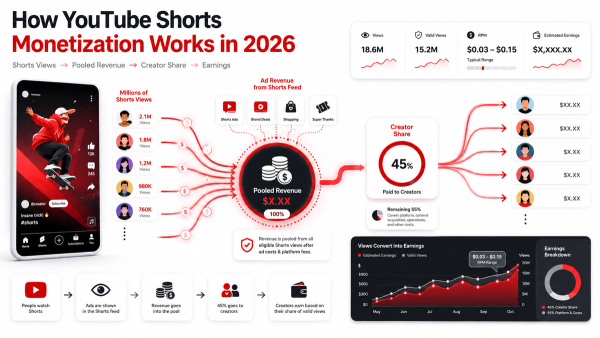
Repurposed Shorts monetize exactly like any other Short: through the pooled model, with the creator keeping 45 percent of their allocated share, and typical earnings of $0.03 to $0.15 per 1,000 views. To qualify, your channel must be in the YouTube Partner Program and meet the Shorts monetization policies, and the content must be original. Repurposing your own long-form video is original content; it is your footage, your script, and your voice. The direct income will look small, and that is the expected answer. The value of the repurposed Short is the audience it acquires. The Shorts Earnings Calculator shows you the direct money at your expected views, and the YouTube Money Calculator shows the long-form income those new subscribers support, which is the number that tells you repurposing is working. Estimate both, because reporting only the direct number is how creators conclude this strategy is worthless.
Common Repurposing Mistakes to Avoid
- No hook: opening on a logo, a slow setup, or mid-scene context kills the first two seconds, which is where Shorts live or die.
- Whole-segment reuploads: pasting an uncut segment with no pacing, no captions, and no payoff is the content-farm move.
- Wrong aspect ratio: publishing 16:9 crops that lose captions and subjects on phones.
- Overrunning 60 seconds: clips past the limit silently lose Shorts distribution and monetization.
- Captions as walls of text: unbroken caption blocks are unreadable at swipe speed.
- No link back: publishing a great Short with no path to the long-form video wastes the entire funnel.
- Skipping the quality review: a repurposed Short still needs the same factual and policy check as any upload, because a lazy clip is still your brand.
Every mistake is a process gap, which means every mistake has a checklist fix. The workflow table above is the fix.
Final Takeaway
Repurposing long-form into Shorts is the cheapest growth engine on YouTube in 2026: you reuse footage you already paid to produce, and you turn your library into a discovery machine that feeds your long-form income. The discipline is in the workflow, reading the retention graph, editing hook-first, cutting to 60 seconds and 9:16, formatting captions, linking back, and repeating every upload. Run the numbers the right way: model the direct Shorts money with the free Thumbix Shorts Earnings Calculator, and model the long-form income those subscribers support with the YouTube Money Calculator. And before you export, check your clip with the Shorts Duration Calculator, your title with the Shorts Title Checker, and your captions with the Shorts Caption Formatter. Then ship the first batch, because the workflow only gets better with reps.
Frequently Asked Questions
How do I turn long videos into Shorts?
Read the retention graph, pick 3-5 high-retention moments, edit hook-first into vertical 9:16 clips under 60 seconds, add readable captions, and link each Short back to the full video.
What moments should I clip into Shorts?
Moments that work without context: strong claims, surprising facts, clear steps, and payoff reveals. Retention spikes and plateaus on your graph are the best candidates.
How long can a repurposed Short be?
Up to 60 seconds in 2026, since October 2025. Aim for 45 to 55 seconds to respect retention, and check the duration before export.
Do repurposed Shorts get demonetized?
No, when done properly. Your own footage, script, and voice are original content. Lazy reuploads of unedited segments, or stitched content from other channels, are what monetization policies target.
How do I format captions for Shorts?
Keep them accurate, timed to the speech, in two-to-four-word lines, and inside the vertical safe area. The Shorts Caption Formatter handles the line breaks.
How much do repurposed Shorts earn?
Typically $0.03 to $0.15 per 1,000 views through the pooled model. The real value is the subscribers and long-form watch time they generate.
How many Shorts should I make from one video?
Three to five is a solid target, batched in one session and scheduled across the following days.
Do I need a separate channel for repurposed Shorts?
No. Post them on the same channel so subscribers and watch time compound toward your monetization targets and feed your long-form videos.